
Apple has quietly made a significant U-turn just three months after launching one of the most controversial visual changes in iPhone history. With the release of iOS 26.2, the company is finally giving users more control over the much-debated Liquid Glass interface a move that many iPhone owners are already calling long overdue.
The update, which became available on Friday, December 12, introduces a new feature that allows users to tone down the intensity of the translucent, glass-like effects that were introduced earlier this year. For anyone who struggled with readability, eye strain, or simply disliked the look of Liquid Glass, iOS 26.2 represents a clear acknowledgment from Apple that the design did not land as smoothly as expected.
Apple Softens Its Most Divisive Design Choice
Liquid Glass first arrived with iOS 26, which Apple unveiled during its Worldwide Developers Conference (WWDC) on June 9, 2025, before rolling it out publicly on September 15. The design marked a dramatic departure from Apple’s long-standing flat and blocky interface, replacing it with icons and controls that appeared translucent, reflective, and dynamically distorted.
Apple described Liquid Glass as a material-inspired design that “reflects and refracts its surroundings,” creating a sense of depth and motion across the operating system. App icons, text, buttons, sliders, and even media controls adopted varying levels of transparency, reacting in real time to wallpapers and background content.
Craig Federighi, Apple’s senior vice president of software engineering, praised the redesign at launch, calling it “gorgeous” and “immersive.” However, once millions of users began interacting with it daily, the feedback quickly turned mixed — and often outright negative.
Users Push Back on Readability and Comfort
Almost immediately after iOS 26 launched, social media platforms filled with complaints from users who found the new look visually distracting and difficult to use. Many argued that the transparency reduced readability, especially on the lock screen and home screen, where clocks and icons blended awkwardly with background images.
Some users even reported physical discomfort, saying the warped reflections and subtle distortions made their screens uncomfortable to look at for long periods. Others joked that the slightly angled appearance of icons made them feel “drunk” when navigating their phones.
The criticism grew so intense that one viral post claimed Apple co-founder Steve Jobs “would have fired everyone” responsible for approving the design. While clearly exaggerated, the comment reflected a broader sentiment: many users felt Liquid Glass prioritized style over usability.
iOS 26.2 Introduces a Simple but Powerful Fix
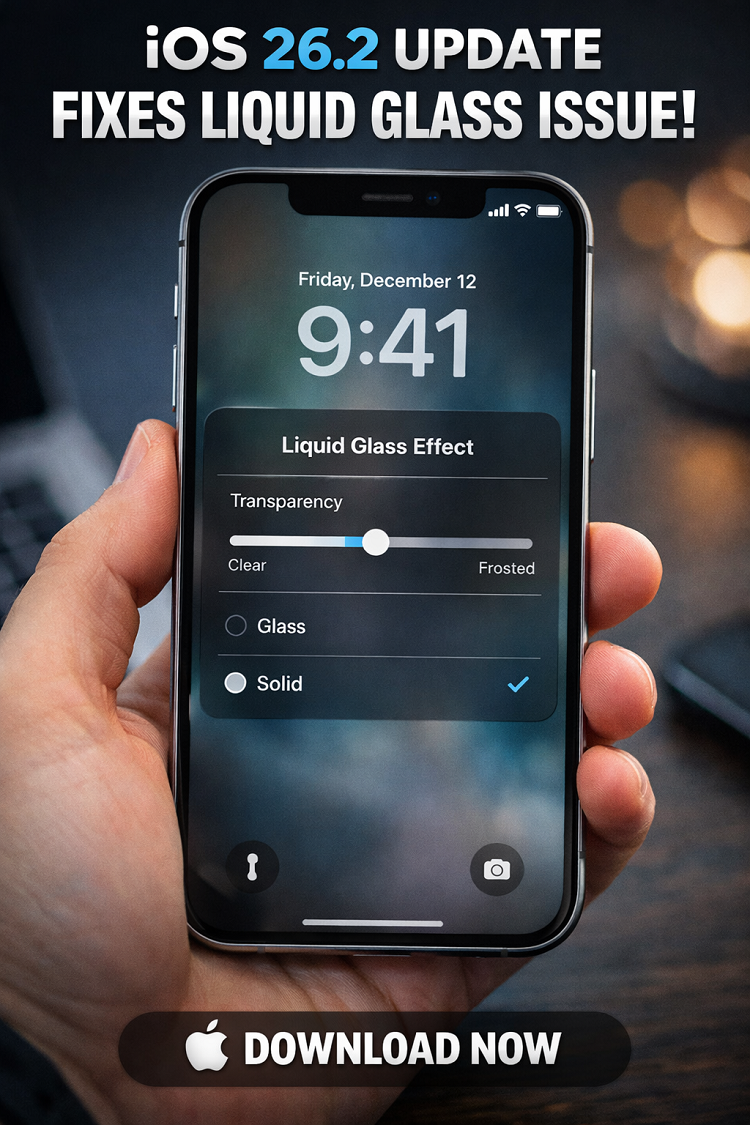
With iOS 26.2, Apple has now taken a meaningful step toward addressing those complaints. The update introduces a new slider on the lock screen that allows users to adjust the transparency of the digital clock.
Instead of being locked into Apple’s original vision, users can now choose how translucent or opaque the clock appears. Sliding the control toward one end makes the clock nearly transparent, while moving it the other way gives it a more frosted, solid appearance that significantly improves readability.
For users who want even more clarity, Apple has added an additional option below the slider that lets you switch from “Glass” to “Solid.” Selecting this removes most of the translucent effect entirely, offering a cleaner and more traditional look.
Social Media Reacts Positively
The response online has been overwhelmingly positive. Many iPhone users wasted no time adjusting the new setting as soon as they installed the update.
One user posted on X: “This is the first thing I did after installing iOS 26.2 adjusted the Liquid Glass transparency on the clock.” Another added: “Now Apple just needs to add this slider everywhere so I can finally switch to frosted glass.”
A third summed it up succinctly: “Turns out readability still matters.”
These reactions highlight how a relatively small customization option can dramatically improve user satisfaction especially when it addresses a widely shared frustration.
How to Download and Install iOS 26.2
Updating to iOS 26.2 is quick and straightforward. To install the update manually, follow these steps:
-
Open the Settings app on your iPhone
-
Scroll down and tap General
-
Select Software Update
-
If iOS 26.2 is available, tap Install Now
If your phone displays “Download and Install,” tap it, enter your passcode when prompted, and follow the on-screen instructions. The download typically takes only a few minutes, depending on your internet connection.
Alternatively, you can choose “Update Tonight,” which will install the update automatically overnight while your iPhone is charging and connected to Wi-Fi.
For future updates, Apple also recommends enabling Automatic Updates, ensuring your device stays up to date with the latest features and security improvements without manual intervention.
More Than Just a Design Tweak
While the Liquid Glass slider is grabbing most of the attention, iOS 26.2 includes several other useful additions. Among them are:
-
Alarms for Reminders, allowing users to receive audible alerts
-
Offline lyrics in Apple Music, making it easier to sing along without an internet connection
-
In-game score banners for Apple’s Games app
-
AI-generated chapter markers in the Podcasts app
-
An added verification step for AirDrop, enhancing security when sharing files
Apple also notes that the update includes important bug fixes and security patches, though the company typically keeps those details brief.
Updates Across the Apple Ecosystem
Alongside iOS 26.2, Apple has released corresponding updates for its other devices, including Mac, Apple Watch, Apple TV, and Apple Vision Pro. This synchronized rollout reinforces Apple’s strategy of maintaining a tightly integrated ecosystem where features and security improvements arrive across platforms at the same time.
A Rare Admission and a Smart One
While Apple rarely openly admits design missteps, iOS 26.2 feels like a quiet concession that Liquid Glass went too far for many users. By adding customization rather than abandoning the design outright, Apple preserves its artistic vision while restoring control to users a balance that aligns more closely with the company’s long-standing philosophy.
For anyone who disliked Liquid Glass or found it hard on the eyes, this update is more than cosmetic. It’s a reminder that user feedback still matters and that even Apple is willing to rethink its choices when enough voices speak up.
If you haven’t updated yet, iOS 26.2 may be the version that finally makes Liquid Glass tolerable or even enjoyable again.